

Memory leaks can play havoc with your computer systems, especially if they make it through into production. They can degrade performance drastically, or crash the application with an Out of Memory error. Sometimes, if either the heap has been configured very large, or the leak affects native memory, they can cause other running applications to slow down or crash.
They can also be very difficult to debug. Java heap dump analysis is the major source of information when it comes to troubleshooting memory issues. This article looks at how to take a heap dump and use it to track down elusive memory leaks.
What is a Heap Dump?
A heap dump is a snapshot of the contents of the heap at a given moment. It does not include native memory used by the JVM, which is used to store off-heap data, as illustrated in the diagram below. The memory model is explained more fully in this video: JVM Memory.
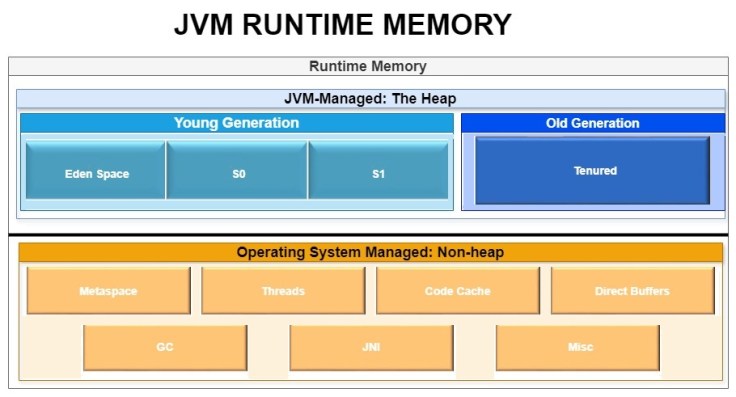
Fig: JVM Memory Model
There are, in fact, 9 types of Out of Memory errors in Java, affecting different memory areas.
The heap dump contains information about every object in the heap, including:
- The address;
- The data type or class name;
- The size;
- Incoming and outgoing references, making it possible to identify the object’s parents and children;
- The contents.
Heap dumps are created in binary, which means we need a tool such as Eclipse’s MAT or HeapHero to make sense of the contents.
Note that since the heap dump stores the actual contents of memory, it should be treated as confidential. It could, for instance, hold data such as credit card numbers or social security numbers.
What is a Memory Leak?
A memory leak occurs when faulty code allows unused objects to build up in memory. The most likely causes are:
- Objects are not dereferenced when they’re no longer needed, preventing them from being garbage collected;
- A loop that creates objects doesn’t have a valid termination condition, causing more and more unnecessary objects to be created.
In rare cases, a memory leak can be caused by unusual conditions, such as finalizer() methods hanging, keys being altered within collections, and uncleared thread local variables.
Often, memory leaks can be detected before they actually cause system crashes by analyzing the behavior of the garbage collector (GC). The image below shows healthy GC behavior compared to GC behavior when there’s a memory leak. The charts were produced by GCeasy, a tool which analyzes GC logs.

Fig: GC Behavior: Healthy vs Memory Leak
As you can see in the second chart, memory is building up over time: the GC is freeing some memory, but the leak is causing memory usage to continually increase. You may like to learn more from this video: Interesting Garbage Collection Patterns.
The GC clears away any objects in memory that no longer have valid references pointing to them. References are cleared when:
- The code containing the reference goes out of scope, for example, when a method completes and is removed from the stack;
- The object is explicitly set to null;
- In the case of some objects, such as streams, references will be cleared when the object’s close() method is invoked.
If an object is not dereferenced when it’s no longer needed, it will remain in memory.
Memory leaks are likely to cause one of two things:
- A proliferation of objects of the same type;
- A single object that continues to grow until it uses up all available memory.
The short program below illustrates a memory leak.
import java.util.TreeMap;
public class BuggyProg9 {
        TreeMap map = new TreeMap();
        public static void main(String[] args){
// Create an object from this class
// ================================
           BuggyProg9 a = new BuggyProg9();
        }
// Constructor
// ===========
        public BuggyProg9() {
	     long counter = 0;
// Loop that has no valid termination condition
// ============================================
           while (true) {

	     if (counter % 1000 == 0) {
		    System.out.println("Inserted " + counter + " Records to list");
// Delay to ensure there will be time to collect a heap dump before OOM error
// ==========================================================================
                try{Thread.sleep(100);} catch (Exception e) {}
		}
// This map will grow until an OOM error occurs
// ============================================
           map.put(counter,new String(
             "AAAAAAAAAAAAABBBBBBBBBBBBCCCCCCCCCCCCCCCDDDDDDDDDDDDDDDDDDDEEEEEE"));
	     ++counter;
	     }
	}
}
The object map will continue to grow until the heap runs out of memory.
How Do You Take a Heap Dump in Java?
There are several methods you can use to take a heap dump: see this article for a full coverage of ways to take heap dumps.
In this article, we’ll just look at two of them.
For a program that’s currently running, first establish its PID. The jps command is a good way to do this. You can then use the following command to take the heap dump, substituting in the actual file name of the dump and the PID:
jmap -dump:format=b,file=<file-path> <pid>A good strategy, however, is to use JVM switches to request a heap dump whenever there’s an Out of Memory error. This adds no overhead to the system, so it’s worth including it for all applications. To enable this for the sample program above, the JVM would be invoked like this:
java -XX:+HeapDumpOnOutOfMemoryError -XX:HeapDumpPath=BuggyProg9.dmp BuggyProg9Java Heap Dump Analysis
Let’s now look at how we can use a heap dump to find memory leaks. As mentioned earlier, the dump is in binary, so we need to use an analysis tool. Eclipse’s MAT works well, but here we’ll be using HeapHero, which has the added advantage that its machine learning tools can often accurately diagnose the leak immediately.
HeapHero can be installed locally, via API, or by uploading the dump to the HeapHero website. Heaps containing sensitive information should not be uploaded to a website: rather use the on-premise version.
HeapHero produces an interactive report, letting us explore the dump to trace suspicious objects.
The report has several sections.
If HeapHero’s machine learning was able to detect potential memory leaks, it will display a warning message at the front of the report. The images below show some examples.

Fig: Warning message showing that a single object is occupying most of memory
In this case, it’s extremely likely that this object is the cause of the memory leak, and is probably growing uncontrollably.

Fig: Warning message showing a large number of objects of the same class
This warning indicates that a method is likely to be repeatedly creating objects, and is probably in a loop.
Next, the report shows some statistics. These are useful when we’re configuring the heap size.

Fig: HeapHero Overview
The next section is likely to be the most useful when you’re detecting memory leaks. It lists all objects ordered from largest to smallest, as shown in the image below:

Fig: Largest Objects
In most cases, the memory leak will be caused by one of the top 3 large objects. Here, the thread main is holding 99.2% of the used heap memory. The shallow heap is the memory occupied by the object itself, whereas the retained heap is the memory used by all its child objects. The next step is to discover all the children of this object, to pinpoint which of them is using all this memory.
You can click ‘more’ as indicated by the red arrow to see a pop-up menu, and choose ‘List Objects with’ > ‘Outgoing references’ to see the object’s children. ‘Incoming References’ is also useful: it shows the object’s parents, which tells you what holds an uncleared reference to the object.
Alternatively, you can click on ‘Chart View’, which lets you quickly see the largest objects. Clicking on an object takes you down a level to see its children. This way, you can quickly drill down until you find the object that is actually holding the memory, as seen in the image below.

Fig: Chart View
The image was taken from the heap dump report for the sample program BuggyProg9. As you can see, it’s showing that the offending object is a TreeMap.
On the right-hand side of the report, you can see the actual contents of this object.

Fig: Actual data held in the object
From here, you should easily be able to identify the code that is causing the memory leak.
The Histogram section of the report can also be useful, as in the image below.

Fig: HeapHero Histogram
Here you can see that there are more than eight hundred thousand objects of the inner class TreeMap$Entry, which is likely to be caused by a memory leak.
Conclusion
Memory leaks can be highly disruptive, and also hard to troubleshoot.
The heap dump contains a snapshot of the heap at a given moment, and is the best source of information for debugging the issue. Since the heap dump is in binary, you need an analytical tool such as Eclipse’s MAT or HeapHero to retrieve meaningful information from the dump.
In this article, we’ve looked at a sample program that contains a memory leak, and traced the problem using the HeapHero tool.
This should give you a good idea of how to use Java heap dump analysis to debug memory issues in your own systems.